
The link to macOS
The DEXT is a DriverKit system extension running in user space. It receives SCSI requests from macOS and presents the LUNs on your NAS as devices.
iSCSI4NAS / ARCHITECTURE
A unique architecture.
Picosegmentation enables an entirely new application architecture.
iSCSI4NAS separates DEXT, Core and GUI (graphical user interface) through clear responsibilities and controlled transitions. Your connections keep running while you quit, update or restart the interface.
DEXT and Core carry the data. The GUI shows the current state and accepts your commands.
DEXT / CORE / GUI
The driver presents the disk. The Core keeps the connection. The GUI puts you in control. Each component has its own responsibility.
The DEXT is a DriverKit system extension running in user space. It receives SCSI requests from macOS and presents the LUNs on your NAS as devices.
The native Core manages iSCSI sessions, authentication, target profiles and reconnection. It owns the connection to your NAS and exchanges block data with the DEXT.
The GUI displays targets, disks and status. It sends commands to the Core and receives the current state. Your disk data does not pass through the GUI.

The GUI runs in its own process. If an error causes it to crash, Core and DEXT keep working. Your existing iSCSI connections stay active. Reopen the interface to reconnect to the running Core and see its current state.
THE DATA PATH
macOS, DEXT, Core and NAS form the data path. DEXT and Core exchange requests and data through a shared ring. The GUI uses a separate XPC connection for control and status. A closed window does not stand between your Mac and your data.

COMMAND + Q / COMMAND + OPTION + Q
The architecture has a practical benefit. Two keyboard shortcuts give you two clearly different choices.
Command + Q quits the GUI. Your existing iSCSI connections keep running. When you open iSCSI4NAS again, the interface reconnects to the running Core and shows its current state.
Command + Option + Q ends all connections in an orderly way and quits iSCSI4NAS completely.

INDEPENDENT UPDATES
You can replace and update the GUI while Core and DEXT continue working. The new interface reconnects to the existing Core. Your active iSCSI sessions remain there.
An unchanged DEXT stays installed. If a driver installation is needed, the app handles it as a separate operation. A change to the interface does not automatically mean replacing the driver.
PICOSEGMENTATION
Picosegmentation combines clearly defined code zones with cryptographically protected gates. Each zone has a specific responsibility. Controlled transitions determine which actions may run under which conditions.
A gate is a checkpoint in the code. It checks the specific action, its target and the current state. A request alone does not grant permission.
After successful checks, the protected operation receives cryptographically signed permission. Before execution, the system checks that it is valid and matches the request. Permission for one target cannot simply be reused for another.
Signed permissions are bound to the current program run. New key material is created at startup. Permissions from an earlier run are no longer valid.
The cryptographic protection incorporates a fingerprint of the gate’s executable code. It binds permissions to the expected code and the current program run. Deviations are detected at startup and at checkpoints before protected actions. A permission that does not match is rejected.
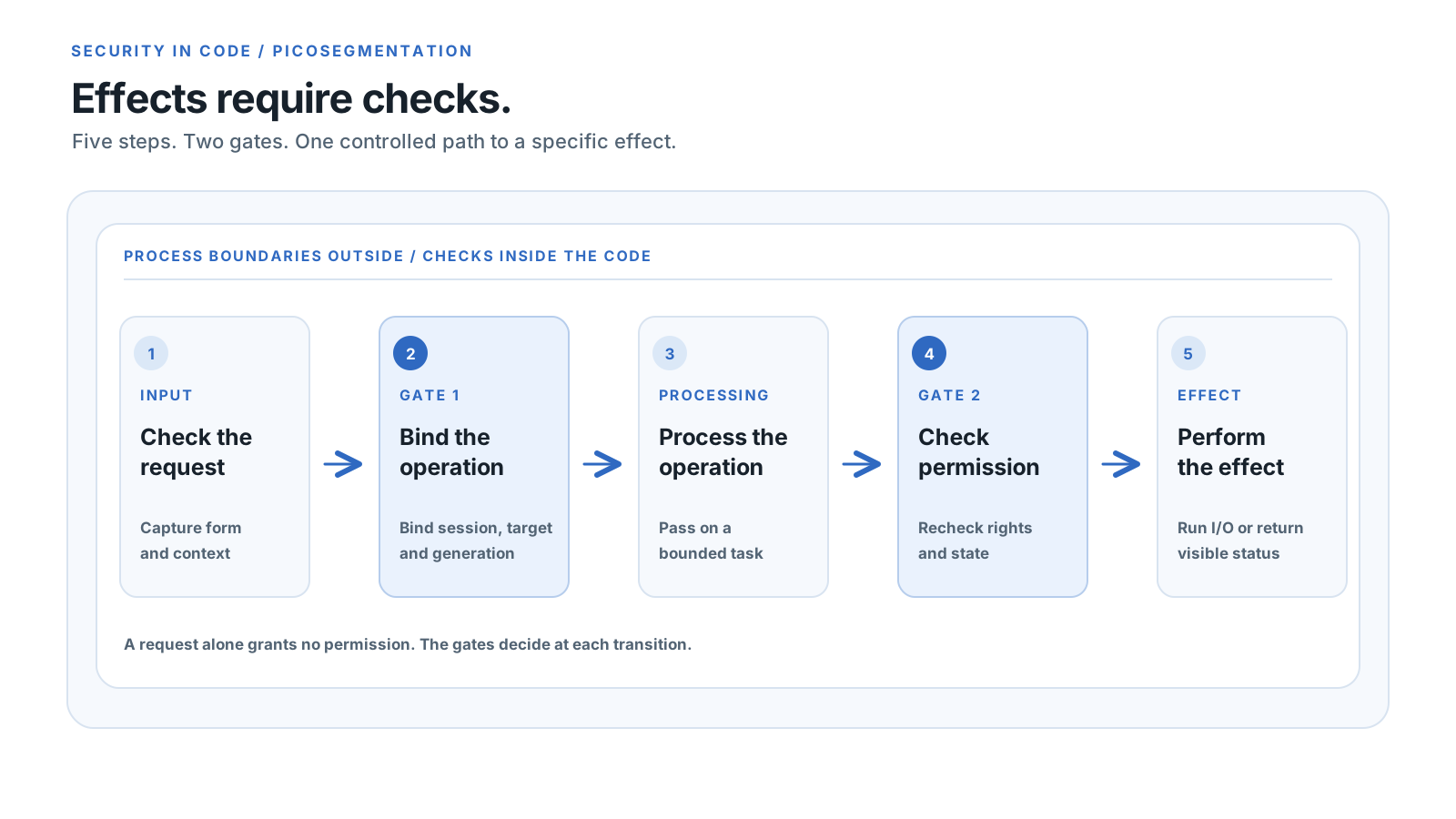
These clear responsibilities also create new freedom in application design. In iSCSI4NAS, the GUI provides controls and displays status. Core and DEXT keep the service running. Together with separate processes, this structure allows the interface to close, receive an update or restart after a crash while existing iSCSI connections remain active.
Read about PicosegmentationDEVELOPMENT / QUALITY
From early experiments to an architecture of our own. The figures include today’s foundation and the development work beyond it.
Foundations, design and architecture
Test definitions for the product and future components
Lines of our own code in total
Product code and development code
Product code. Today’s foundation comprises DEXT, Core and GUI.
Components already developed and additional implementations from development branches, including our own development environment.
Breakdown of the current foundation
Rounded figures. Counts include the current foundation and additional implementations from development work. Identical files and repeated snapshots are consolidated. Documentation, separate test directories, blank lines, comments, third-party libraries and generated files are excluded from code totals.
The project began with foundations and experiments: learning about compilers and Swift, building GUI prototypes and exploring how the interface should behave. Kernel debugging and disassembly helped us understand how macOS works. That work shaped the design, architecture and clear separation of DEXT, Core and GUI.
The almost three years include learning, experimenting, discarding approaches and refining the product. They also include development for future stages of the product and extensive architecture and source code documentation.
Automated checks cover login and CHAP, checksums, fragmented packets and recovery after transmission errors.
Simulated crashes, delayed responses and concurrent copy operations exercise the handling of active writes. Separate host check programs also examine DEXT logic.
Tests cover LUN selection, device status and settings. One example: failed authentication in a separate probe must preserve the status of an existing connection.
Hands-on development on the Mac complements these checks. This includes replacing the GUI while Core and DEXT keep existing iSCSI connections running.
OUR PRODUCT
iSCSI4NAS is commercial software. Its source code is not public.
The product represents almost three years of foundational work, design, architecture and development. We are continuing that work as an independent commercial product. We retain control over the commercial use of our implementation.
A reliable iSCSI initiator needs ongoing maintenance, extensive testing and updates for new macOS versions. Our commercial model provides the foundation for this work and support. Reliability and data integrity remain central to it.
We explain how iSCSI4NAS is built and how we assess its quality.
Manage your connections when you need to. Let iSCSI4NAS keep working when you do not need the interface.